
How Does Plug-In Solar Work? From Sunlight to Savings
Compartir
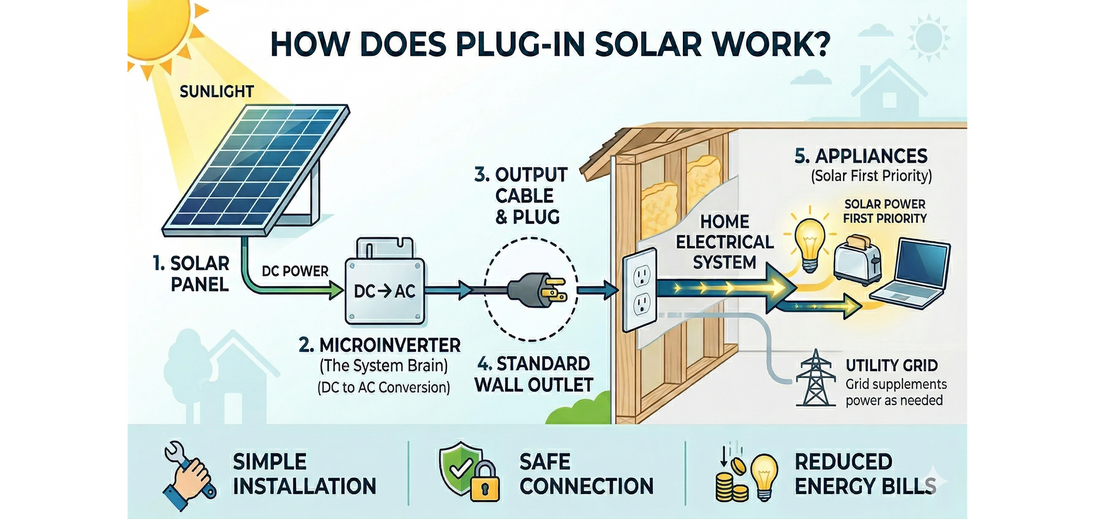
Plug-in solar panels convert sunlight into AC electricity through a microinverter and then feed that power into your home through a standard outlet. Your home's wiring uses the solar electricity first, before pulling any additional power from the grid. The result is a direct, real-time reduction in what you pay for electricity..
That's the short answer. But if you've ever wondered what's actually happening inside the wall, how a solar panel connected to an outdoor outlet somehow powers your refrigerator, and why your circuit breaker doesn't trip, this article is for you.
Table of Contents
- What Plug-In Solar Is (Quick Version)
- How Electricity Actually Flows From a Solar Panel Into Your Home
- Why Your Home Uses Solar Power First
- The Microinverter: The Brain of the System
- Is Plug-in Solar Safe? What the Wiring Actually Handles
- The Outlet Connection: Options, Requirements, and Protections
- How to Install a Plug-In Solar Kit
- How Much Power Does a Plug-In System Actually Generate?
- Plug-In Solar vs. Traditional Hard-Wired Solar: Two Different Tools
- Frequently Asked Questions
- Ready to Get Started?
What Plug-In Solar Is (Quick Version)
Plug-in solar (also known as plug and play and balcony solar) is a solar panel system that connects to your home through a standard outdoor outlet: with no hardwiring, electrician, or permit required in many situations. A typical kit includes solar panels, a microinverter, mounting hardware, and cables. Some systems add battery storage for evening use or outage backup.
If you want the full plug-in solar picture, start with our complete plug-in solar guide. This article goes deeper on a specific question the guide introduces but doesn't fully answer: what is happening inside your walls when a solar panel is plugged into an outlet?
How Electricity Actually Flows From a Solar Panel Into Your Home
This is the question most people have but rarely find a plain-language answer to. Let's walk through it step by step.
Step 1: Sunlight hits the panel and generates electricity
Solar panels are made of photovoltaic (PV) cells, typically silicon. When photons from sunlight strike the cell, they knock electrons loose and cause them to flow; that's the electric current. The electricity produced at this stage is in a form called direct current (DC), meaning it flows in one direction, like a battery.
Your home doesn't run on DC. It runs on alternating current (AC), where the direction of the current reverses 60 times per second. That's where the “microinverter” in the solar kit comes in.
Step 2: The microinverter converts DC to AC
A microinverter is a small device, about the size of a hardcover book, that sits between your solar panels and the outlet. Its job is to convert the DC electricity from the panels into 120V AC electricity: the same type that comes out of every outlet in your home.
The microinverter also synchronizes its output with the grid's frequency and voltage. This synchronization is what allows the electricity to flow into your home's wiring seamlessly, without your lights flickering or your appliances noticing anything different.
Step 3: The AC electricity enters your home's wiring through the outlet
Here's where most people's questions live, and where a common assumption turns out to be wrong.
Most of us think of outlets as one-way: power comes out and appliances use it. That's true for everything plugged into your home normally. But an outlet is just a connection point in a circuit. The wiring itself has no built-in direction. What determines which way current flows is the difference in electrical potential, the voltage, between two points on the circuit.
When the microinverter produces electricity at the same voltage and frequency as the grid and pushes it into the outlet, it's adding voltage to that point in the circuit. The current naturally flows from that higher-potential point toward the appliances on the same circuit that are drawing power, the same way it would from the grid. The outlet doesn't "know" it's running in reverse. It's just a connection, and the physics works the same in both directions.
This is also why synchronization matters: if the inverter's voltage or frequency were even slightly out of step with the grid's, the mismatch would cause problems. Exact synchronization is what makes the transition seamless; your lights don't flicker, your appliances don't notice, and the circuit treats solar-generated electricity the same as grid electricity.
When the microinverter pushes electricity into the outlet, it's joining a circuit that already has power flowing through it from the grid. How does the home's wiring "know" to use the solar power first? That's Kirchhoff's Current Law.
Kirchhoff's Current Law states that the sum of all currents meeting at any junction in a circuit equals zero, meaning the circuit automatically balances supply and demand at every connection point.
In practical terms: your appliances don't care where their electricity comes from. They simply draw what they need. When solar power is available at the outlet, the circuit draws from that source before pulling additional current from the grid. The utility meter only records the difference, what the grid actually had to supply after solar covered its share.
For example, let’s say your home is using 1,000W at a given moment. Your 800W plug-in solar kit is producing 750W in afternoon sun. The circuit draws 750W from the solar panels and only 250W from the grid. Your meter records 250W, not 1,000W. You're effectively buying 75% less electricity at that moment.
Step 4: The Power Meter monitors and balances in real time
In a well-designed plug-in solar kit, there's a fourth component that makes this work cleanly: a Power Meter installed in your breaker box.
The Power Meter reads your home's total energy consumption continuously, updating every fraction of a second, and communicates with the inverter via a dedicated sub-GHz radio signal (separate from your home WiFi, so it keeps working even during an internet outage). When the solar panels are producing more energy than your home is consuming, the Power Meter signals the microinverter to throttle back output. And then when consumption rises, the inverter ramps up production to match.
This real-time balancing act is what's called zero-export functionality: the system is designed so that solar production never exceeds what your home is actively consuming. Excess power doesn't flow back onto the grid. It's also a key reason why these systems can operate without a utility interconnection agreement in some states; the utility's concern about uncontrolled backfeed simply doesn't apply.
It’s also why batteries can be a good investment, especially for larger plug and play solar systems. They help you get the most energy out of your solar setup.
Step 5: Excess energy is stored or throttled
If your system includes a battery, any solar production beyond what your home needs in real time charges the battery rather than being throttled away. The battery then discharges in the evening when the panels aren't producing, continuing to offset your grid draw into the night.
If there's no battery, the inverter simply reduces its output to match consumption. Nothing goes to waste from a circuit safety standpoint, and nothing goes to the grid.
Why Your Home Uses Solar Power First
Your home's circuits don't distinguish between solar-generated AC and grid-supplied AC. Both arrive at the same voltage and frequency. The circuit draws from whatever is locally available.
Because the solar inverter is plugged into an outlet on that circuit, its electricity is available right away, before your home has to draw more power from the grid.
The practical result: every watt your panels produce during daylight hours is a watt you don't buy from the utility. Your meter only runs when demand exceeds solar production. On a sunny afternoon with a 2000W system (or two 2000W systems), a typical household may pull very little from the grid at all during peak hours.
This is also why you don't need a special bidirectional meter to benefit from plug-in solar. You're not selling electricity back; you're simply consuming less of what you'd otherwise buy. A standard meter records the reduction accurately.
Want to know how much a plug-in solar system could actually save you?
Get the OwnWatts Solar Buying Guide. It covers system sizing, savings estimates by household type, what to look for in a kit, and how to avoid the most common mistakes first-time buyers make.
The Microinverter: The Brain of the System
The microinverter does more than convert DC to AC. It's also responsible for two safety functions that are essential to how plug-in solar operates in a home.
Grid synchronization. The inverter constantly monitors the grid's frequency (60 Hz in the US) and voltage (120V). It only produces electricity when it can match these parameters exactly. This is what allows the solar power to merge with the grid's supply seamlessly at the outlet.
Anti-islanding protection. If the grid goes down, the inverter detects the loss of the grid signal and shuts off within milliseconds. This is a deliberate safety feature required by IEEE 1547 for all grid-tied inverters. However, a charged Smart Battery can continue to operate independently during an outage.
A note on UL 3700: UL Solutions launched a new certification specifically for plug-in solar systems in January 2026. It adds requirements around shock hazard at the plug, circuit overload protection, and safe installation design. As of this writing, no products have received UL 3700 certification, but it's a meaningful standard to watch for as more products go through testing. For now, UL 1741 certification on the inverter is the standard to look for when evaluating any plug-in solar kit.
Is Plug-in Solar Safe? What the Wiring Actually Handles
The safety question around plug-in solar is legitimate and worth addressing directly. Standard US home wiring was designed around a one-way assumption: electricity flows from the breaker panel to the outlets, and circuit breakers protect against too much current flowing in the other direction.
When a solar inverter pushes electricity into an outlet, it's adding current to that circuit from the opposite direction. The circuit breaker doesn't "see" this additional current; it only monitors what's flowing from the panel. Without safety features, the combined current from the grid and a solar source could exceed what the wiring was designed to handle.
This is a real risk with improperly designed or uncertified systems. It's also why the equipment design matters so much.
In a properly engineered system with a Power Meter, the power load is managed continuously. The Power Meter ensures that solar production never exceeds what the home is consuming, so the wiring never sees more current than it would from the grid alone. If consumption drops suddenly (a major appliance turns off), the inverter throttles within fractions of a second.
Additional protections in certified kits:
- Dedicated outdoor circuit requirement. Best practice is connecting a solar kit to a dedicated circuit, one that doesn't share a breaker with other outlets. This means the inverter's output is the only additional source on that line.
- Safety Gate Adapter (SGA). For homes without a dedicated outdoor circuit, there is still a safe option. Craftstrom's SGA connects directly to the outlet and monitors the circuit. If needed, it will automatically shut down the system if the combined current approaches unsafe levels. This is a hardware failsafe independent of the Power Meter.
- Anti-backfeed and anti-islanding. As described above, the inverter shuts down when the grid signal is lost, protecting both the home and utility workers.
The short answer to "is plug-in solar safe": yes, with well-designed and certified equipment that is properly installed, and following manufacturer guidelines. When evaluating any kit, look for ETL or UL listing on the inverter, a power control system that prevents circuit overload, and clear installation requirements for a dedicated circuit.
The Outlet Connection: Options, Requirements, and Protections
The outlet connection is one of the most common points of confusion for people new to plug-in solar. Here's a plain-language breakdown of what you actually need, what protections are in place, and what to do if your home doesn't have the right setup already.
The standard setup: a dedicated outdoor outlet
In a typical plug-in solar installation, the AC cable from the microinverter plugs into a dedicated outdoor outlet, one that has its own circuit breaker in your main panel and doesn't share a circuit with other outlets or devices. Most US homes built in recent decades have at least one outdoor outlet on the exterior wall, often near the garage, back patio, or front entry.
The dedicated circuit matters for one important reason: it ensures that the only additional current source on that line is the inverter itself. When no other devices share the circuit, the Power Meter balances solar output against consumption with nothing unexpected in the mix.
Weatherproofing and plug protection
Outdoor outlets in the US are required by the National Electrical Code (NEC) to be protected by a GFCI (Ground Fault Circuit Interrupter): the type of outlet with the "Test" and "Reset" buttons you recognize from bathrooms and kitchens. GFCI protection cuts power instantly if it detects a ground fault, protecting against shock from water contact.
Outdoor outlets must also be housed in a weatherproof enclosure. There are two common types: a standard flip-up cover that closes when the outlet is not in use, and an "in-use" cover (also called a bubble cover) that seals around a plug even when something is connected. For a solar installation where the AC cable will be plugged in continuously, an in-use weatherproof cover is the better choice, and most codes require it for permanently occupied outdoor connections.
The inverter itself also carries weather protection. Craftstrom's Hedy inverter has a NEMA 3R enclosure rating, meaning it's protected against rain and sleet. Mount it in a shaded, dry spot with airflow around it; it may get warm during operation, which is normal. Never touch the inverter during operation, and never enclose it in a way that blocks airflow.
What if your outdoor outlet isn't on a dedicated circuit?
If your home has an outdoor outlet but it shares a circuit breaker with other outlets or devices, you have two options.
The first is to use Craftstrom's Safety Gate Adapter (SGA). The SGA comes with any Craftstrom Solar Kit and plugs between the inverter's AC cable and the outlet. It continuously monitors the circuit's total current and automatically shuts the system down if the combined load approaches unsafe levels. The SGA is a hardware-level failsafe that makes it possible to use a non-dedicated circuit more safely, without rewiring anything.
The second option is to have an electrician add a dedicated outdoor circuit. This is a straightforward job, typically a few hours of work, and results in a permanent installation that is up to code. If you're planning to keep your system long-term, a dedicated circuit is the cleaner solution.
No outdoor outlet at all? You still have options.
If your home doesn't have an outdoor outlet, you're not out of options, but each path has a different tradeoff.
Option 1: Add an outdoor outlet. A licensed electrician can run a new circuit from your breaker panel through an exterior wall and install a weatherproof outlet box outside. This is more involved than a typical weekend DIY project, local codes generally require a permit and inspection for new electrical circuits, but the result is a permanent, code-compliant installation. Costs vary by region and circuit complexity, but budget roughly $200–$500 for a straightforward run. Some experienced DIYers do tackle this themselves; if you go that route, pulling a permit and scheduling an inspection is still a good call.
Option 2: Route the AC cable through a window or door gap. Solar panels, especially Craftstrom's semi-flexible bifacial panels, can be mounted in a variety of outdoor locations: a balcony railing, fence, ground mount, or exterior wall. If no outdoor outlet is available, some homeowners mount the panels outside and route the AC cable through a slightly open window or door to an indoor outlet. This is less elegant than a dedicated outdoor circuit, but it works with a few caveats: the cable must not be pinched or compressed by the frame, the gap should be sealed as well as possible against drafts and moisture, and the indoor outlet used should still ideally be on a lightly loaded or dedicated circuit.
Option 3: Mount panels at or near a window and plug into an indoor outlet. Because Craftstrom's solar panels are semi-flexible and lightweight, they can also be positioned on a windowsill, angled in a window frame, or placed just outside a window with the AC cable running directly inside to a wall outlet. This approach works best for south, east, or west-facing windows with good sun exposure and a short cable run. Output will be slightly reduced compared to a fully exposed outdoor installation, since window glass absorbs a portion of sunlight, but it's a viable starting point for renters or anyone who wants to get up and running before committing to a more permanent setup. As with Option 2, use a lightly loaded circuit and keep the cable path free of sharp bends or pinch points.
Whichever connection method you use, the underlying safety principle stays the same: keep the outlet's circuit as lightly loaded as possible, use the SGA if the circuit isn't dedicated, and keep the inverter dry and ventilated.
How to Install a Plug-In Solar Kit
Installation is genuinely accessible for most homeowners: there are no specialized tools, no roof access, and no electrician required for the main setup. Here's what the process looks like from start to finish with a Craftstrom plug and play solar kit.
Before you start: what you'll need
- A sunny spot for your panels (south, east, or west-facing; south maximizes year-round output in the Northern Hemisphere)
- A dedicated outdoor outlet on its own circuit, or the Safety Gate Adapter for a shared or indoor circuit
- Access to your main breaker panel for the Power Meter installation
- A 2.4 GHz WiFi network for the Craftstrom app setup
- Basic tools: screwdriver, and possibly a drill for mounting hardware
Step 1: Mount the solar panels
Craftstrom's panels are semi-flexible and lightweight at about 9 pounds each, which makes positioning much easier than rigid panels. They ship with eyelets for secure attachment: try to use all of them. Improper mounting can void the warranty and create wind-load damage risk. The panels need stabilization in the back; don't mount them as free-hanging surfaces. Craftstrom also recommends 3M Very High Bond double-sided tape as a secondary adhesive alongside the eyelets.
During unboxing and installation, don't bend the panels beyond 30 degrees. A small area of distortion can crack internal cells, and stepping on a panel or applying excessive pressure in one spot will damage it.
Common mounting locations include a fence, balcony railing, garage wall, ground-mounted frame, or flat roof surface. If you're routing the cable through a window to an indoor outlet, position the panels so the cable has a clean, unobstructed path to the opening with no sharp bends.
Step 2: Connect the panels to the inverter
Each pair of panels connects to one inverter using MC4 connectors; the weatherproof push-and-click connectors standard in the solar industry. The connectors are keyed to fit together correctly; you'll feel a click when they're fully joined. Some MC4 connections require firm pressure to fully engage, which is normal.
If your kit has multiple inverters (the 1600W kit has four; the 2000W kit has five), connect them to each other in parallel using the AC-to-AC connector cables included in the kit. The final inverter gets the M25 AC cable that runs to the outlet. Make sure the open connector cable ends are protected from moisture as you’re setting up.
Mount the inverter in a shaded, dry location with airflow around it. Don't touch the inverter during operation; it acts as a heat sink and gets warm, which is normal and intentional.
Step 3: Attach both antennas to the inverter
The Craftstrom inverter has two antennas: one for WiFi and one for sub-GHz communication with the Power Meter and battery. Both must be attached before powering up. The sub-GHz antenna is what allows the inverter and Power Meter to form their own local network, independent of your home WiFi, so even if your internet goes down, the system keeps balancing and producing energy.
Step 4: Install the Power Meter
The Power Meter uses current transformer (CT) clamps that clip onto the main conductors inside your breaker panel: the large cables that carry power from the utility into your home. The clamps go around the conductors without cutting any wires, and no wiring changes are made to the panel itself.
That said, opening your breaker panel does mean working near live electrical components. The main breaker can be switched off to de-energize the branch circuits, but the conductors coming in from the utility side remain live regardless. If you're comfortable working around that, the CT clamp installation is straightforward. If not, have a licensed electrician do this one step. It's a quick job for a pro, and the rest of the installation is still fully DIY.
The Power Meter also connects to your WiFi network for app communication.
Step 5: Plug in and start producing
With the panels mounted, the inverter connected and antennaed, and the Power Meter installed, the final step is plugging the AC cable into your outdoor outlet. Solar production starts immediately once the plug is in and the panels are in sunlight.
Make sure an in-use weatherproof cover is in place on the outlet. Do not plug anything else into that outlet while the kit is connected.
Step 6: Set up the Craftstrom app
Download the Craftstrom app and create an account. The in-app setup walks you through adding each inverter (scan the barcode or enter the device ID manually), connecting to your WiFi network, and pairing the Power Meter. Once configured, the app shows real-time solar production, home consumption, and the balance between them, along with historical data so you can see your cumulative bill offset over time.
If you're setting up multiple inverters, set up each one individually and follow the guide's instruction to "forget" the CS-WiFi network between each inverter installation before moving to the next one.
A note on permits and local code
The main installation, panels, inverter, and outlet connection, is accessible for most renters and homeowners without a contractor. The Power Meter installation inside the breaker panel is where local regulations and personal comfort level matter most. Some jurisdictions require a licensed electrician for any work inside the panel; others don't. Check your local code before proceeding, and when in doubt, hire an electrician for that step only. It's a small part of the overall job.
How Much Power Does a Plug-In Solar System Actually Generate?
There’s a simple formula for solar energy production: peak watts × average peak sun hours per day = daily kWh production.
Most of the continental US averages 4–6 peak sun hours per day, depending on location and season.
|
System |
Daily Output (4–6 sun hours) |
Approx. Monthly Output |
|---|---|---|
| 800W kit | ~3.2–4.8 kWh/day | ~96–144 kWh/month |
| 1200W kit | ~4.8–7.2 kWh/day | ~144–216 kWh/month |
| 2000W kit | ~8–10 kWh/day | ~240–300 kWh/month |
| 2x 2000W kits | ~16–24 kWh/day | ~480–720 kWh/month |
The average US household uses about 875 kWh per month. An 800W system offsets roughly 11–16% of that, a 2000W system roughly 27–34%, and two 2000W systems offset roughly 60–82%of the average electric bill in the US. Those offsets translate to meaningful bill reductions, especially in high-rate areas like California, Hawaii, or New England.
For a more detailed breakdown of what specific wattages can power, see our practical guide to solar watts.
Plug-In Solar vs. Traditional Hard-Wired Solar: Two Different Tools
Plug-in solar and traditional hard-wired solar are both great energy solutions. They're just designed for different situations. A typical hard-wired installation involves panels bolted to your roof, wiring that runs directly into your electrical panel, a licensed electrician, building permits, utility inspections, and a process that often takes two to four months from contract to first watt produced, with a price tag of $15,000 to $30,000 or more.
Plug-in solar sidesteps all of that. It's a different tool for a different situation.
Choose plug-in solar if:
- You rent, or own a home where a full hard-wired installation isn't practical or worthwhile
- You want to start generating solar power without a major upfront commitment
- You want to avoid the permitting process, contractor coordination, and months of waiting
- You're testing solar before committing to a larger system
Traditional hard-wired solar may make more sense if:
- You own your home and plan to stay long-term
- Your electricity usage is high enough that a 4000W plug-in system (2 x 2000W systems) won't offset enough
- Your utility offers strong net metering rates that make exporting excess power financially worthwhile
Some homeowners end up with both: supplementing their existing hard-wired installation with a plug-in system to generate more energy and savings during peak usage and seasons.
Frequently Asked Questions
Does plug-in solar work when the power goes out?
Not on its own. Plug-in solar systems with standard inverters shut off when the grid signal is lost; this is intentional to protect utility workers. To have power during an outage, you need a battery with off-grid capability and an inverter that supports islanding mode. Portable solar panels and power stations like EcoFlow's DELTA series are an off-grid alternative to plug-in solar that can supply power during an outage.
Can renters install plug-in solar?
In many cases, yes. Plug and play solar systems mounted on balconies, patios, or fences with non-penetrating hardware don't require structural changes. Always check your lease and local rules, and consider portable power stations as an alternative if a full plug-in system isn't feasible.
Do I need to tell my utility?
With a properly certified zero-export system, many people do not. The system is designed not to feed energy back into the grid, which is what requires utility coordination.
That being said, the rules vary by utility and state. Some utilities require notification for any solar installation; others are silent on plug-in systems specifically. Utah residents are in the clear for systems up to 1200W, and Virginia residents can also freely install these systems beginning in 2027. Dozens of other states have legislation in the works to make plug-in solar easier on residents.
Many people in California and throughout the country are installing plug-in solar now, by themselves, without a permit. When in doubt, a quick call to your utility's customer service line is worthwhile. Our plug-in solar regulations guide covers the regulatory landscape in more detail.
Does plug-in solar work without net metering?
Yes. Net metering is about selling excess electricity back to the grid, a feature of larger rooftop systems that export power. Plug-in solar with zero-export technology doesn't send anything to the grid, so net metering isn't relevant. You benefit from reduced consumption, not from credits on your bill.
Can I expand my system over time?
Yes. Most plug-in solar kits can be expanded by adding panels and inverters up to a system maximum. Batteries can be added at any point. Starting with an 800W system and adding panels later is a practical approach for budget-conscious buyers.
What happens on cloudy days?
Solar panels still produce electricity on cloudy days; production is reduced but not zero. On overcast days, your system offsets less of your consumption; on clear days, it offsets more. Averaged across a month, the numbers in the table above reflect typical real-world conditions including cloudy days.
Will this work with my existing rooftop solar?
Generally yes, though best practice is to check with your rooftop solar installer and utility. A plug-in system with zero-export functionality operates independently and doesn't interact with your existing solar system or net metering arrangement.
Not Sure Which System Is Right for You?
Figuring out the right plug-in solar setup doesn't have to be complicated. Our free Solar Buying Guide walks you through system sizing, honest savings math, what certifications to look for, and the questions to ask before you spend a dollar.
Get the Free Solar Buying Guide →
Or if you're ready to browse: Shop Plug-In Solar Kits →


